MoonDrop EVO II Review: Make any IEM wireless!
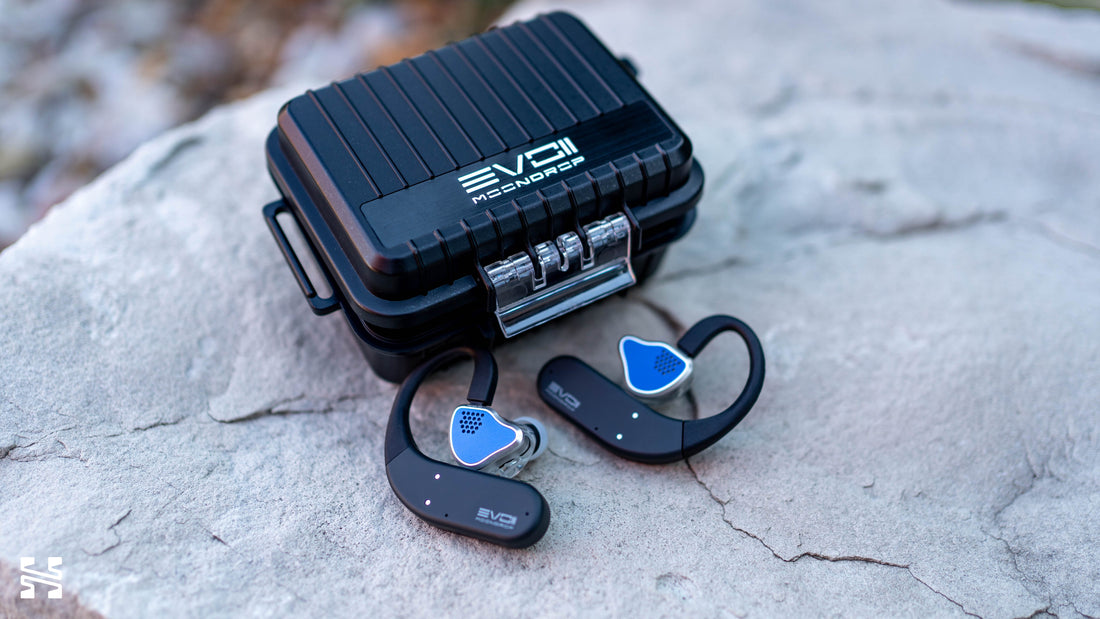
The MoonDrop EVO II is a $100 true wireless stereo (TWS) adapter system with a few tricks up its sleeves that promises to turn any wired IEM wireless.

Introduction
Wireless headphones and IEMs are by far the most popular products. While audiophiles have yet to fully catch up with that train, it seems like every hi-fi audio company is making a push to have some sort of wireless offering in their portfolio.
Yet surprisingly, while there are many DAC/amp devices that offer Bluetooth support, there are only a handful of true wireless (TWS) adapters. These are earhooks that enable Bluetooth connectivity for any IEM, allowing hobbyists to use their favorite IEMs wirelessly. While they’ve existed for a while now, it seems to remain a niche within the industry with only a few companies updating existing models every few years.
All that to say, enter the MoonDrop EVO II. This is the latest true wireless adapter from one of the biggest Chinese brands. It costs $100 and is packed with the latest features. Let’s take a look to see if it’s worth it.
What we like
-
Great battery life
-
Seamless and consistent connectivity
-
10 band PEQ with community profiles
-
Reasonably powerful DAC/amp
-
Stable fit with earhooks
-
Game mode for lower latency
-
Tank of a case with an IPX7 rating
What we don’t like
-
The case is massive
-
Slight hissing at end of tracks
-
MoonDrop App needs polish
-
A bit expensive given its basic functionality
-
Touch control can be a little finicky
-
Non-interchangeable connectors
-
Dual-device mode is glitchy

Build and Design
Externally, the most immediate design cue of the EVO II is its rugged Pelican-like case. For this iteration, MoonDrop made durability a key feature of the EVO II, boasting that it’s crush-proof and IPX7 water resistant. There’s even a pressure relief knob in the front though I have no clue if that will ever be necessary. The whole thing feels extremely robust and the snap lid opens and closes with conviction.
Internally, the EVO II is unique in that it places the IEMs upwards with the faceplates flat against a felt pad on the case and the earhooks resting on pogo pins. This is in contrast to every other TWS adapter case that has a cutout for the IEM. The lid is lined with a thick foam that comes on top of the nozzles of the IEMs and another bar comes down on the earhooks to hold everything in place.
This works surprisingly well. I initially thought there wouldn’t be enough space to close the lid, but I’ve tested this on some very large IEMs and didn’t have any issues. The foam compresses a good amount. It’s a clever solution that allows for a wider range of IEMs to be accommodated in the case while preventing any movement.

The earhooks work well for me. I think perhaps they’re a bit on the small side with a tighter curvature around the ears, but it does help keep everything stable. I used it without any issues at the gym and never felt like it was loose. There aren’t any physical buttons as MoonDrop has opted for a touch panel instead.
The only potential dealbreaker: it’s a big case. Barely pocketable is how I would describe it. Even throwing it into a bag is awkward due to its bulkiness. At least the case has handles on the side to attach carabiners for backpacking flexibility.
The final annoyance is that the charging port is inside the case.

Features
Let’s take a quick look at its spec sheet and compare it against some other popular TWS adapters:
|
Price (USD) |
$100 |
$100 |
$27 - $35 |
$220 |
$399 |
|
Bluetooth / chip |
BT 6.0, custom MoonDrop TWS-01 |
BT 5.2, Dual ES9318 |
BT 6.0, unknown chip |
BT 6.0, Qualcomm QCC5181 |
BT 5.2, Qualcomm QCC5100-series |
|
Output power |
Not published |
Not published |
≥30mW @ 16Ω |
≥85mW @ 32Ω, ≥55mW @ 16Ω |
120mW @ 32Ω, 4V @ 300Ω |
|
Codecs |
SBC, AAC, LHDC-V, LDAC, LC3 |
aptX Adaptive, aptX TWS+, aptX HD, aptX, AAC, SBC |
AAC, SBC |
aptX Lossless, LDAC, LHDC V5, aptX Adaptive, aptX, LC3, SBC |
LDAC, LHDC/HWA, aptX Adaptive, aptX HD, aptX LL, aptX, AAC, SBC |
|
Battery (hooks / case) |
15h / 60h |
2 h / unknown |
10h / 50h |
7h / 20h |
~7h / ~35h |
|
Connectors |
2-pin at time of writing; MMCX and FitEar incoming |
2-pin |
2-pin and MMCX depending on version (or combo) |
Both 2-pin and MMCX included in box |
Both 2-pin and MMCX included in box |
|
App / Other Features |
10-band PEQ with MoonDrop community profiles, dual-device connection, game mode |
80mΩ output impedance |
None |
10-band PEQ, low latency game mode, case display, Bluetooth multipoint |
Auto impedance detection, Qi charging |
There are of course a few other models that exist and this list of tech features is by no means comprehensive. But this should give a high level comparison of what each device brings to the table.
Importantly, from the spec sheet alone, we can see some substantial differences versus the original EVO. Switching to the custom MoonDrop TWS-01 chipset brought significant improvements to its battery life - from nearly unusable at 2 hours to all day power. The addition of the MoonDrop App for 10-band PEQ and other firmware settings is a very nice value add. And while the EVO II’s charging case may feel a little too large and cumbersome, the original EVO’s was not much better without having the rugged design either. However, it is a shame that the EVO II lost aptX support compared to the original.
One final note is the output impedance of the EVO II. It’s not stated anywhere unfortunately, but given that the original EVO lists it at 80mΩ and MoonDrop’s expertise in IEMs, the EVO II should be similarly low (i.e. <1 Ω). A low impedance is key to avoiding any frequency response colorations in IEMs. I didn't notice any issues with the IEMs I was using.
Usability
Connectivity
Simply put, the EVO II is competent. The core functionality of plugging in your IEMs, connecting it to your phone, putting it on, and listening to music all work almost seamlessly. I did run into one or two glitches here and there but it was trivial to overcome with a simple re-connect. Floor noise isn’t an issue, but I do sometimes hear electronic noise in the silence at the end of tracks.
Drop-offs were rare. Battery life was good at my settings (high gain, low volume using the MoonDrop x Crinacle Silicon), hitting 50% after 5 hours on a single charge. Range is about as good as any other wireless product. As Bluetooth chipsets have gotten better over the years, concerns over fundamentals are largely a thing of the past. The EVO II passed these basic tests easily.

Where the EVO II stumbles is in the dual-device mode. I tested it by connecting my phone and my PC. At first, the connection worked great. Turning on some music on my PC automatically pauses my phone and switches over. However, switching back to my phone revealed some glitches. While it did automatically pause my PC and start on my phone, it would randomly pause after 4 - 5 seconds. Even when I manually started the track again, it would pause after a few seconds. I had to turn off the connection to my PC for it to behave properly again. As such, this feature works but you’ll have to babysit the connectivity.
Operation and the MoonDrop App
You control the EVO II by tapping the touch panels on each side. There’s the basic suite of operations for Pause/Play, Forward/Back, and Voice Assistant. As a bonus, there’s the Game Mode setting at 4 taps. MoonDrop advertises it drops latency down to 60 ms. Practically speaking, it is a noticeable improvement - it goes from a half-second of lag after input to near instantaneous. It will drain the battery quicker, however.
The built-in microphone, like many similar devices, is not great. It works best in a quiet environment and if you raise your voice, but don’t be surprised if you get a few “Could you please repeat that?”.

To access all of its controls such as enabling LDAC or gain settings, you’ll need to download the MoonDrop App. The app is functional for what you need it to do but it could very much use some polish. I won’t dive into every control but I’ll highlight the most important one: DSP.
One of the best things about MoonDrop’s wireless products is that they all connect to the MoonDrop App that allows for customizable PEQ via DSP. The EVO II in particular features a 10-band PEQ for you to play with. The adjustments are limited, such as a max of +3 dB gain and the system is a little clunky, but it works.
One other cool feature is the AutoEQ function where you select preset tuning curves from other IEMs or from community members who’ve submitted their own EQ settings. Once again, this feature is a little clunky, but it works. Of course, here’s my obligatory warning to not rely on AutoEQ too much.
As for power, trying it across the wide range of IEMs I have, the EVO II is generally powerful enough to handle almost anything you throw at it. I tend to just keep it on high gain and low volume. It even got the Subtonic STORM loud enough, though the dynamic range was noticeably compressed.

Market Position
I’ll start by saying I’ve only extensively tested the EVO II; I haven’t tried all the other TWS adapters in the table above. This section is more of a commentary on where the EVO II sits in the wireless adapter market.
At $100, it’s actually on the lower end of the TWS adapter options. That’s because FiiO and iFi’s offerings have clearly positioned themselves as premium, as we can see with the feature sets crammed into them. The real competitor is the TRN Scallop, which comes in at 1/3rd of the price while ostensibly delivering most of the same core experience. Features like 10-band PEQ, game mode, and multi-device connectivity (even if it is glitchy) are genuinely good additions, but is it worth it?

And this is where I’m split. For many looking to buy an EVO II, they’re likely playing in the $100 - $500 range of IEMs. There’s a budget consciousness here. Paying $100 for a wireless adapter can feel a bit much when that money could be put into another set of IEMs. Especially when the $30 TRN Scallop or other non-TWS Bluetooth adapters like the $20 FiiO BTR11 exist.
For hobbyists with heavier wallets dabbling with higher end, more boutique IEMs, the higher prices of the more premium offerings aren’t too likely to be a problem when they come with Qualcomm chips and aptX. The FiiO UTWS17 justifies its price with the most advanced feature set on the list, a very nice display panel on the front of the case, and a more polished PEQ interface, though I dislike its flimsy flip-top case. The iFi GO Pods on the other hand, despite the older BT 5.2 standard, offers the most power, auto-matching output impedance, and its wireless Qi charging is a nice-to-have quality-of-life improvement.
Finally, we can’t ignore the fact that TWS IEMs themselves are getting very good nowadays at the $100 mark and, importantly, include ANC. That’s a major feature missing from every wireless adapter on the market. I can see where one would rather buy a TWS IEM with ANC for everyday on-the-go and leave their more expensive wired IEMs at home as a dedicated music listening set.

Should You Buy It?
Yes, but only if you’re absolutely clear on your specific needs. For everyday use and commute, I would say just to pick-up a non-TWS adapter like the FiiO BTR11 and put your money towards better IEMs. But if you're dead set on a TWS adapter set (e.g. for the gym) and want a slightly better experience and fuller feature set than the bare minimum, the EVO II would be that option.
Overall, I just think the MoonDrop EVO II would’ve been better priced at $70. At that price, it feels less like paying for a whole extra system and more of a quality-of-life upgrade to your favorite IEM. As it is, I think $100 is a fair, but not competitive, price for the budget minded. To put it more simply: I’m more likely to think twice about all my wireless options.

